


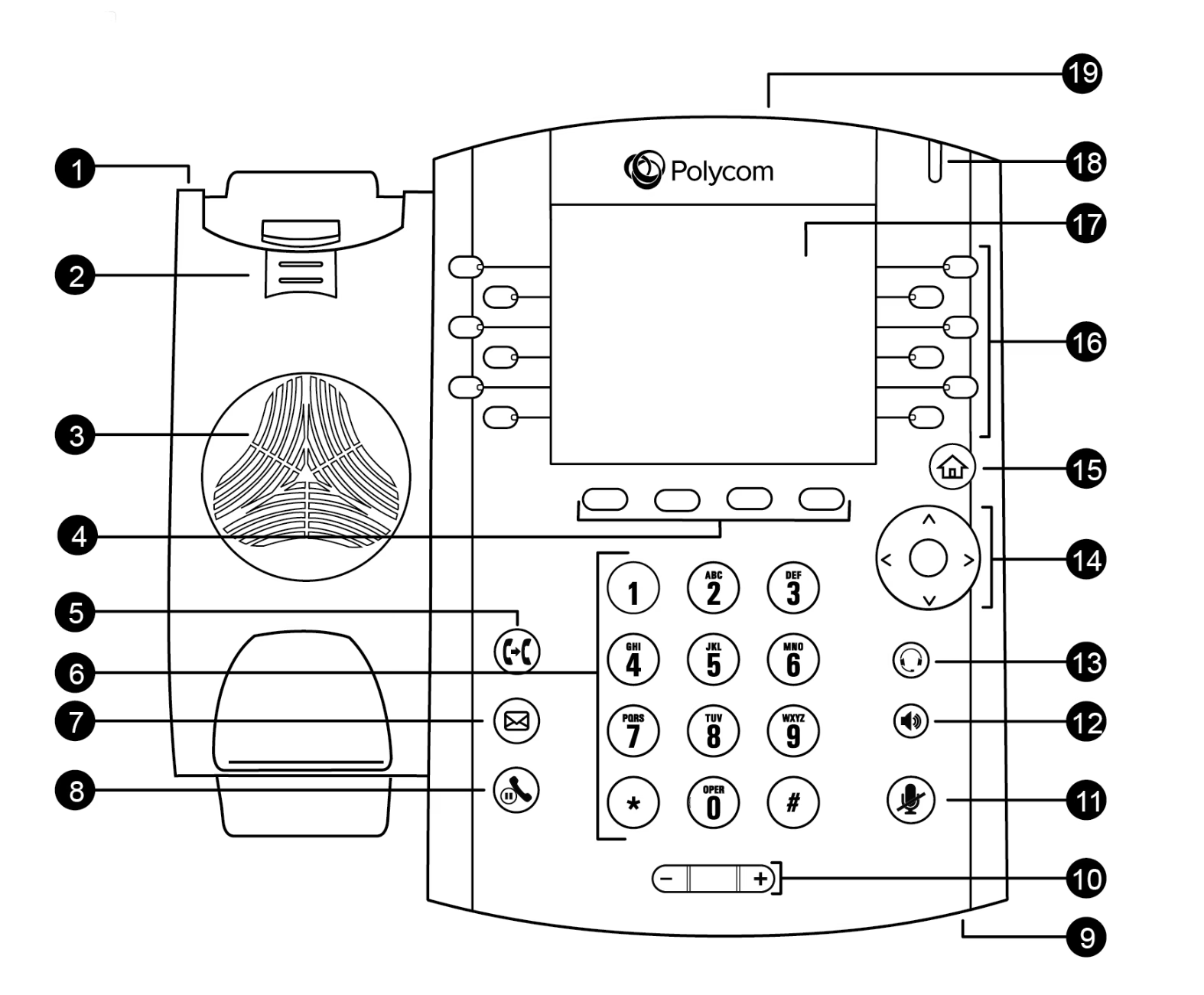
| Refernce Number | Feature | Feature Description |
|---|---|---|
| 1 | Security slot (on back) | Attach a universal security cable lock to your phone so you can secure it to a desktop. |
| 2 | Reversible tab | Secures the handset in the cradle when you position your phone stand at a high angle. To secure the handset, remove the tab, reverse it so the protrusion points up, and reinsert it. Position the handset so the protrusion on the tab fits into the slot on the handset. |
| 3 | Speaker | Provides ringer and speakerphone audio output. |
| 4 | Softkeys | Select context-sensitive keys that display along the bottom of the screen. |
| 5 | Transfer key | Transfer an active call to a contact. |
| 6 | Dialpad | Enter numbers, letters, and special characters. Use the dialpad keys to select menu items that have index numbers. |
| 7 | Messages key | Access and manage instant and voice messages. |
| 8 | Hold key | Hold an active call or resume a held call. |
| 9 | Microphone | Transmits audio to other phones. |
| 10 | Volume keys | Adjust the volume of the handset, headset, speaker, and ringer. |
| 11 | Mute key | Mute or unmute the microphone during an active call. |
| 12 | Speakerphone key | Place and receive calls using the speakerphone. |
| 13 | Headset key | Place and receive calls through a headset. |
| 14 | Navigation keys / Select key | Scroll through information or options displayed on the phone’s screen or select a field of displayed data. |
| 15 | Home key | Display the Home screen from other screens or display the Lines and Calls screen from the Home screen. |
| 16 | Line keys | Select a phone line, view calls on a line, or quickly call a favorite contact. |
| 17 | Screen | A 8.89 cm (3.5 in) color screen with a backlight that enables you to view menu options and data. |
| 18 | Message waiting indicator | Flashes red to indicate when you have new messages. |
| 19 | USB port(s) |
Attach a USB flash drive or USB headset. Included on VVX 401/411 only. |
Last Updated on January 20, 2026